Qwen-Audio-chat FastApi 部署调用
Qwen-Audio 介绍
Qwen-Audio 是阿里云研发的大规模音频语言模型(Large Audio Language Model)。Qwen-Audio 可以以多种音频 (包括说话人语音、自然音、音乐、歌声)和文本作为输入,并以文本作为输出。
环境准备
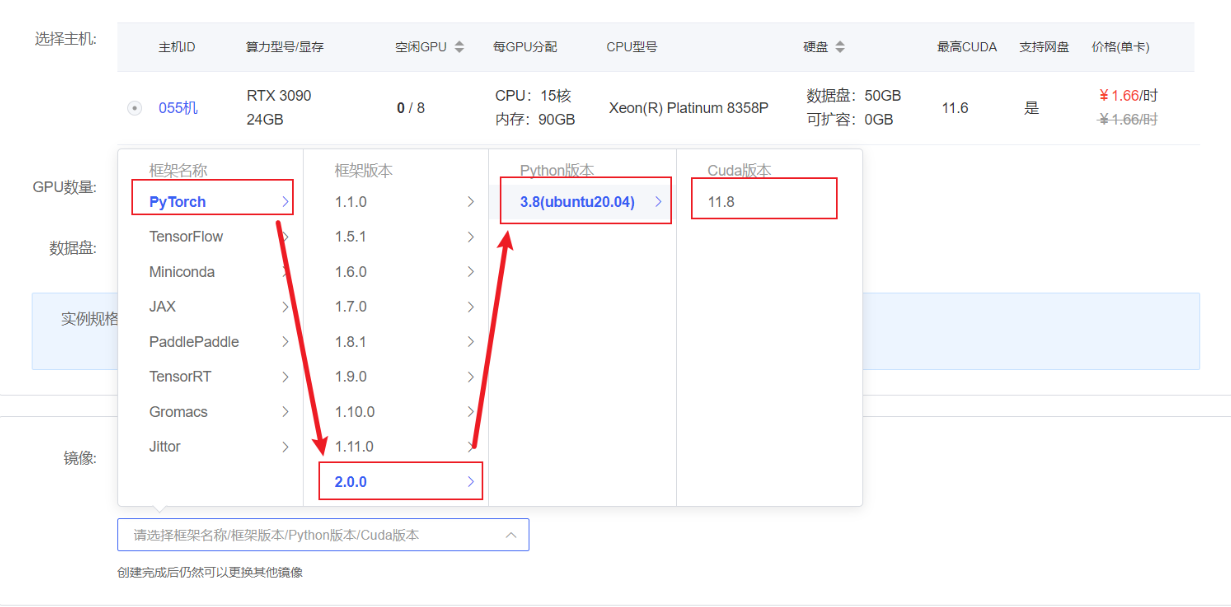
在autodl平台中租一个3090等24G显存的显卡机器,如下图所示镜像选择PyTorch-->2.0.0-->3.8(ubuntu20.04)-->11.8(11.3版本以上的都可以) 接下来打开刚刚租用服务器的JupyterLab图像, 并且打开其中的终端开始环境配置、模型下载和运行演示。
pip换源和安装依赖包
# 升级pip
python -m pip install --upgrade pip
# 更换 pypi 源加速库的安装
pip config set global.index-url https://pypi.tuna.tsinghua.edu.cn/simple

pip install modelscope==1.9.5

pip install accelerate
pip install tiktoken
pip install einops
pip install transformers_stream_generator==0.0.4
pip install scipy
pip install torchvision
pip install pillow
pip install tensorboard
pip install matplotlib
pip install transformers==4.32.0
pip install gradio==3.39.0
pip install nest_asyncio模型下载
使用 modelscope 中的snapshot_download函数下载模型,第一个参数为模型名称,参数cache_dir为模型的下载路径。
在 /root/autodl-tmp 路径下新建 download.py 文件并在其中输入以下内容,粘贴代码后记得保存文件,如下图所示。并运行 python /root/autodl-tmp/download.py 执行下载,模型大小为 20 GB,下载模型大概需要10~20分钟
import torch
from modelscope import snapshot_download, AutoModel, AutoTokenizer
from modelscope import GenerationConfig
model_dir = snapshot_download('qwen/Qwen-Audio-Chat', cache_dir='/root/autodl-tmp', revision='master')测试音频下载
~~~bash wget -O /root/autodl-tmp/1272-128104-0000.flac https://github.com/QwenLM/Qwen-Audio/raw/main/assets/audio/1272-128104-0000.flac ~~~
代码准备
在/root/autodl-tmp路径下新建api.py文件并在其中输入以下内容,粘贴代码后记得保存文件。下面的代码有很详细的注释,大家如有不理解的地方,欢迎提出issue。
from fastapi import FastAPI, Request, File, UploadFile, Query
from transformers import AutoTokenizer, AutoModelForCausalLM, GenerationConfig
import uvicorn
import json
import datetime
import torch
import os
import nest_asyncio
nest_asyncio.apply()

# 设置设备参数
DEVICE = "cuda"  # 使用CUDA
DEVICE_ID = "0"  # CUDA设备ID,如果未设置则为空
CUDA_DEVICE = f"{DEVICE}:{DEVICE_ID}" if DEVICE_ID else DEVICE  # 组合CUDA设备信息

# 清理GPU内存函数
def torch_gc():
    if torch.cuda.is_available():  # 检查是否可用CUDA
        with torch.cuda.device(CUDA_DEVICE):  # 指定CUDA设备
            torch.cuda.empty_cache()  # 清空CUDA缓存
            torch.cuda.ipc_collect()  # 收集CUDA内存碎片

# 创建FastAPI应用
app = FastAPI()

# 处理POST请求的端点
@app.post("/audio/")
async def create_audio_item(file: UploadFile = File(...)):
    global model, tokenizer  # 使用全局变量
    # 保存音频文件到临时路径
    temp_file_path = f"temp/{file.filename}"
    with open(temp_file_path, 'wb') as f:
        f.write(file.file.read())
    file.file.close()

    # 1st dialogue turn
    query = tokenizer.from_list_format([
        {'audio': temp_file_path},  # 使用保存的临时音频文件路径
        {'text': 'what does the person say?'},
    ])
    response, history = model.chat(tokenizer, query=query, history=None)

    # 清理临时文件
    os.remove(temp_file_path)

    now = datetime.datetime.now()  # 获取当前时间
    time = now.strftime("%Y-%m-%d %H:%M:%S")  # 格式化时间为字符串
    # 构建响应JSON
    answer = {
        "response": response,
        "status": 200,
        "time": time
    }
    print(f"[{time}] Response: {response}")  # 打印日志
    torch_gc()  # 执行GPU内存清理
    return answer

@app.get("/test-audio/")
def test_audio(audio_file_path: str = Query('/root/autodl-tmp/1272-128104-0000.flac', alias='audio'),
               text_query: str = Query('what does the person say?', alias='text')):
    """
    测试音频接口,用户可以指定音频文件路径和文本查询
    :param audio_file_path: 音频文件的路径
    :param text_query: 文本查询内容
    """

    # 使用model和tokenizer处理音频和文本
    query = tokenizer.from_list_format([
        {'audio': audio_file_path},
        {'text': text_query},
    ])
    response, history = model.chat(tokenizer, query=query, history=None)

    return {"response": response}

# 主函数入口
if __name__ == '__main__':
    mode_name_or_path = '/root/autodl-tmp/qwen/Qwen-Audio-Chat'
    # 加载预训练的分词器和模型
    tokenizer = AutoTokenizer.from_pretrained(mode_name_or_path, trust_remote_code=True)
    model = AutoModelForCausalLM.from_pretrained(mode_name_or_path, trust_remote_code=True,torch_dtype=torch.bfloat16,  device_map="auto")
    model.generation_config = GenerationConfig.from_pretrained(mode_name_or_path)
    model.generation_config.pad_token_id = model.generation_config.eos_token_id
    model.eval()  # 设置模型为评估模式
    # 启动FastAPI应用
    # 用6006端口可以将autodl的端口映射到本地,从而在本地使用api
uvicorn.run(app, host='0.0.0.0', port=6006, workers=1) # 在指定端口和主机上启动应用Api 部署
在终端输入以下命令启动api服务
cd /root/autodl-tmp
python api.py加载完毕后出现如下信息说明成功。
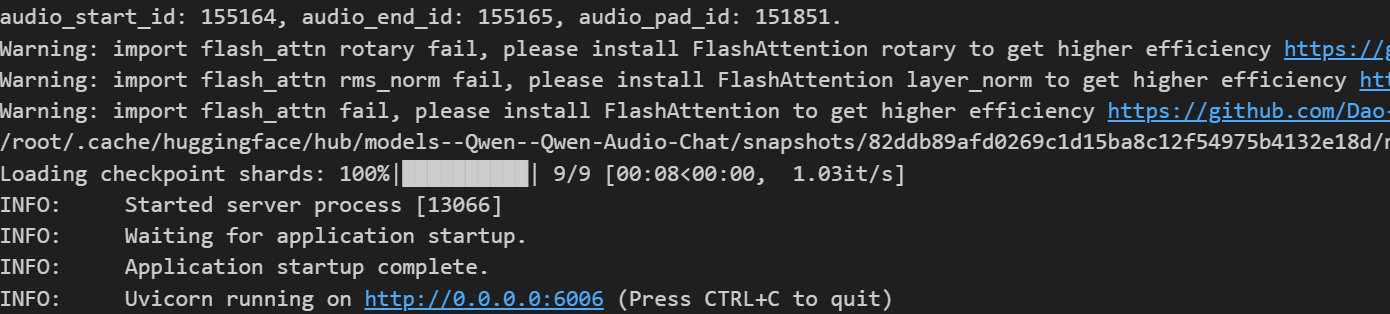
默认部署在 6006 端口,通过 POST 方法进行调用,可以使用curl调用,如下所示:
curl http://127.0.0.1:6006/test-audio/也可以使用python中的requests库进行调用,如下所示:
import requests

def get_audio_response(audio_file_path, text_query):
    # 设置API的URL
    url = 'http://127.0.0.1:6006/test-audio/'

    # 设置音频文件路径和文本查询的参数
    params = {
        'audio': audio_file_path,  # 音频文件路径
        'text': text_query         # 文本查询
    }

    # 发送GET请求
    response = requests.get(url, params=params)

    # 提取所需信息
    result = {
        "response": response.json(),
        "status_code": response.status_code,
        "time": response.headers.get('Date')  # 获取响应头中的时间信息
    }
    return result

if __name__ == '__main__':
    # 测试请求
    audio_file = '/root/autodl-tmp/1272-128104-0000.flac'
    text_query = '这是男生还是女生说的?'
    completion = get_audio_response(audio_file, text_query)
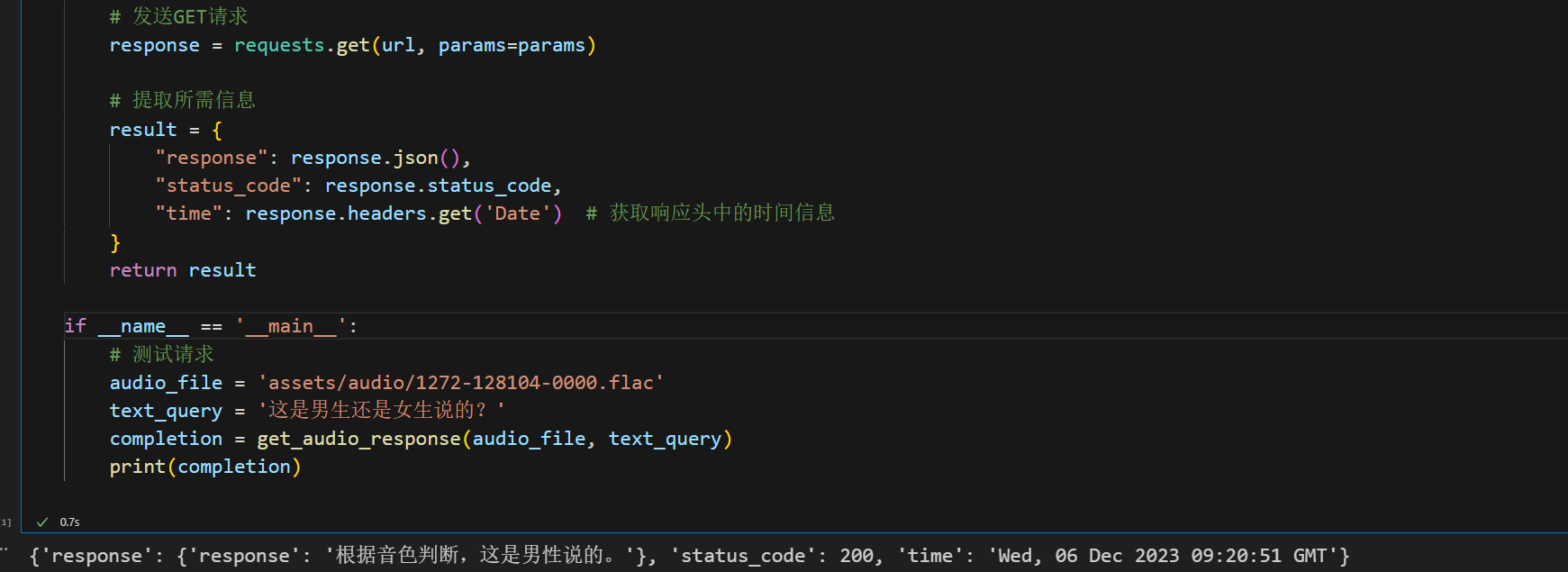
print(completion)得到的返回值如下所示:
{
	'response': {'response': '根据音色判断,这是男性说的。'},
	'status_code': 200,
	'time': 'Wed, 06 Dec 2023 09:20:51 GMT'
}
Qwen-Audio-chat WebDemo 部署
Qwen-Audio 介绍
Qwen-Audio 是阿里云研发的大规模音频语言模型(Large Audio Language Model)。Qwen-Audio 可以以多种音频 (包括说话人语音、自然音、音乐、歌声)和文本作为输入,并以文本作为输出。
环境准备
在autodl平台中租一个3090等24G显存的显卡机器,如下图所示镜像选择PyTorch-->2.0.0-->3.8(ubuntu20.04)-->11.8(11.3版本以上的都可以) 接下来打开刚刚租用服务器的JupyterLab图像, 并且打开其中的终端开始环境配置、模型下载和运行演示。
pip换源和安装依赖包
# 升级pip
python -m pip install --upgrade pip
# 更换 pypi 源加速库的安装
pip config set global.index-url https://pypi.tuna.tsinghua.edu.cn/simple

pip install modelscope==1.9.5

pip install accelerate
pip install tiktoken
pip install einops
pip install transformers_stream_generator==0.0.4
pip install scipy
pip install torchvision
pip install pillow
pip install tensorboard
pip install matplotlib
pip install transformers==4.32.0
pip install gradio==3.39.0
pip install nest_asyncio模型下载
使用 modelscope 中的snapshot_download函数下载模型,第一个参数为模型名称,参数cache_dir为模型的下载路径。
在 /root/autodl-tmp 路径下新建 download.py 文件并在其中输入以下内容,粘贴代码后记得保存文件,如下图所示。并运行 python /root/autodl-tmp/download.py 执行下载,模型大小为 20 GB,下载模型大概需要10~20分钟
import torch
from modelscope import snapshot_download, AutoModel, AutoTokenizer
from modelscope import GenerationConfig
model_dir = snapshot_download('qwen/Qwen-Audio-Chat', cache_dir='/root/autodl-tmp', revision='master')代码准备
在/root/autodl-tmp路径下新建 chatBot.py 文件并在其中输入以下内容,粘贴代码后记得保存文件。下面的代码有很详细的注释,大家如有不理解的地方,欢迎提出issue。
# Copyright (c) Alibaba Cloud.
#
# This source code is licensed under the license found in the
# LICENSE file in the root directory of this source tree.
"""A simple web interactive chat demo based on gradio."""
from argparse import ArgumentParser
from pathlib import Path
import copy
import gradio as gr
import os
import re
import secrets
import tempfile
from transformers import AutoModelForCausalLM, AutoTokenizer
from transformers.generation import GenerationConfig
from pydub import AudioSegment
# DEFAULT_CKPT_PATH = 'Qwen/Qwen-Audio-Chat'
DEFAULT_CKPT_PATH = "/root/autodl-tmp/qwen/Qwen-Audio-Chat"
def _get_args():
parser = ArgumentParser()
parser.add_argument("-c", "--checkpoint-path", type=str, default=DEFAULT_CKPT_PATH,
help="Checkpoint name or path, default to %(default)r")
parser.add_argument("--cpu-only", action="store_true", help="Run demo with CPU only")
parser.add_argument("--share", action="store_true", default=False,
help="Create a publicly shareable link for the interface.")
parser.add_argument("--inbrowser", action="store_true", default=False,
help="Automatically launch the interface in a new tab on the default browser.")
parser.add_argument("--server-port", type=int, default=8000,
help="Demo server port.")
parser.add_argument("--server-name", type=str, default="127.0.0.1",
help="Demo server name.")
args = parser.parse_args()
return args
def _load_model_tokenizer(args):
tokenizer = AutoTokenizer.from_pretrained(
args.checkpoint_path, trust_remote_code=True, resume_download=True,
)
if args.cpu_only:
device_map = "cpu"
else:
device_map = "cuda"
model = AutoModelForCausalLM.from_pretrained(
args.checkpoint_path,
device_map=device_map,
trust_remote_code=True,
resume_download=True,
).eval()
model.generation_config = GenerationConfig.from_pretrained(
args.checkpoint_path, trust_remote_code=True, resume_download=True,
)
return model, tokenizer
def _parse_text(text):
lines = text.split("\n")
lines = [line for line in lines if line != ""]
count = 0
for i, line in enumerate(lines):
if "```" in line:
count += 1
items = line.split("`")
if count % 2 == 1:
lines[i] = f'<pre><code class="language-{items[-1]}">'
else:
lines[i] = f"<br></code></pre>"
else:
if i > 0:
if count % 2 == 1:
line = line.replace("`", r"\`")
line = line.replace("<", "<")
line = line.replace(">", ">")
line = line.replace(" ", " ")
line = line.replace("*", "*")
line = line.replace("_", "_")
line = line.replace("-", "-")
line = line.replace(".", ".")
line = line.replace("!", "!")
line = line.replace("(", "(")
line = line.replace(")", ")")
line = line.replace("$", "$")
lines[i] = "<br>" + line
text = "".join(lines)
return text
def _launch_demo(args, model, tokenizer):
uploaded_file_dir = os.environ.get("GRADIO_TEMP_DIR") or str(
Path(tempfile.gettempdir()) / "gradio"
)
def predict(_chatbot, task_history):
query = task_history[-1][0]
print("User: " + _parse_text(query))
history_cp = copy.deepcopy(task_history)
full_response = ""
history_filter = []
audio_idx = 1
pre = ""
global last_audio
for i, (q, a) in enumerate(history_cp):
if isinstance(q, (tuple, list)):
last_audio = q[0]
q = f'Audio {audio_idx}: <audio>{q[0]}</audio>'
pre += q + '\n'
audio_idx += 1
else:
pre += q
history_filter.append((pre, a))
pre = ""
history, message = history_filter[:-1], history_filter[-1][0]
response, history = model.chat(tokenizer, message, history=history)
ts_pattern = r"<\|\d{1,2}\.\d+\|>"
all_time_stamps = re.findall(ts_pattern, response)
print(response)
if (len(all_time_stamps) > 0) and (len(all_time_stamps) % 2 ==0) and last_audio:
ts_float = [ float(t.replace("<|","").replace("|>","")) for t in all_time_stamps]
ts_float_pair = [ts_float[i:i + 2] for i in range(0,len(all_time_stamps),2)]
# 读取音频文件
format = os.path.splitext(last_audio)[-1].replace(".","")
audio_file = AudioSegment.from_file(last_audio, format=format)
chat_response_t = response.replace("<|", "").replace("|>", "")
chat_response = chat_response_t
temp_dir = secrets.token_hex(20)
temp_dir = Path(uploaded_file_dir) / temp_dir
temp_dir.mkdir(exist_ok=True, parents=True)
# 截取音频文件
for pair in ts_float_pair:
audio_clip = audio_file[pair[0] * 1000: pair[1] * 1000]
# 保存音频文件
name = f"tmp{secrets.token_hex(5)}.{format}"
filename = temp_dir / name
audio_clip.export(filename, format=format)
_chatbot[-1] = (_parse_text(query), chat_response)
_chatbot.append((None, (str(filename),)))
else:
_chatbot[-1] = (_parse_text(query), response)
full_response = _parse_text(response)
task_history[-1] = (query, full_response)
print("Qwen-Audio-Chat: " + _parse_text(full_response))
return _chatbot
def regenerate(_chatbot, task_history):
if not task_history:
return _chatbot
item = task_history[-1]
if item[1] is None:
return _chatbot
task_history[-1] = (item[0], None)
chatbot_item = _chatbot.pop(-1)
if chatbot_item[0] is None:
_chatbot[-1] = (_chatbot[-1][0], None)
else:
_chatbot.append((chatbot_item[0], None))
return predict(_chatbot, task_history)
def add_text(history, task_history, text):
history = history + [(_parse_text(text), None)]
task_history = task_history + [(text, None)]
return history, task_history, ""
def add_file(history, task_history, file):
history = history + [((file.name,), None)]
task_history = task_history + [((file.name,), None)]
return history, task_history
def add_mic(history, task_history, file):
if file is None:
return history, task_history
os.rename(file, file + '.wav')
print("add_mic file:", file)
print("add_mic history:", history)
print("add_mic task_history:", task_history)
# history = history + [((file.name,), None)]
# task_history = task_history + [((file.name,), None)]
task_history = task_history + [((file + '.wav',), None)]
history = history + [((file + '.wav',), None)]
print("task_history", task_history)
return history, task_history
def reset_user_input():
return gr.update(value="")
def reset_state(task_history):
task_history.clear()
return []
with gr.Blocks() as demo:
gr.Markdown("""\
<p align="center"><img src="https://qianwen-res.oss-cn-beijing.aliyuncs.com/Qwen-Audio/logo.jpg" style="height: 80px"/><p>""") ## todo
gr.Markdown("""<center><font size=8>Qwen-Audio-Chat Bot</center>""")
gr.Markdown(
"""\
<center><font size=3>This WebUI is based on Qwen-Audio-Chat, developed by Alibaba Cloud. \
(本WebUI基于Qwen-Audio-Chat打造,实现聊天机器人功能。)</center>""")
gr.Markdown("""\
<center><font size=4>Qwen-Audio <a href="https://modelscope.cn/models/qwen/Qwen-Audio/summary">🤖 </a>
| <a href="https://huggingface.co/Qwen/Qwen-Audio">🤗</a>  |
Qwen-Audio-Chat <a href="https://modelscope.cn/models/qwen/Qwen-Audio-Chat/summary">🤖 </a> |
<a href="https://huggingface.co/Qwen/Qwen-Audio-Chat">🤗</a>  |
 <a href="https://github.com/QwenLM/Qwen-Audio">Github</a></center>""")
chatbot = gr.Chatbot(label='Qwen-Audio-Chat', elem_classes="control-height", height=750)
query = gr.Textbox(lines=2, label='Input')
task_history = gr.State([])
mic = gr.Audio(source="microphone", type="filepath")
with gr.Row():
empty_bin = gr.Button("🧹 Clear History (清除历史)")
submit_btn = gr.Button("🚀 Submit (发送)")
regen_btn = gr.Button("🤔️ Regenerate (重试)")
addfile_btn = gr.UploadButton("📁 Upload (上传文件)", file_types=["audio"])
mic.change(add_mic, [chatbot, task_history, mic], [chatbot, task_history])
submit_btn.click(add_text, [chatbot, task_history, query], [chatbot, task_history]).then(
predict, [chatbot, task_history], [chatbot], show_progress=True
)
submit_btn.click(reset_user_input, [], [query])
empty_bin.click(reset_state, [task_history], [chatbot], show_progress=True)
regen_btn.click(regenerate, [chatbot, task_history], [chatbot], show_progress=True)
addfile_btn.upload(add_file, [chatbot, task_history, addfile_btn], [chatbot, task_history], show_progress=True)
gr.Markdown("""\
<font size=2>Note: This demo is governed by the original license of Qwen-Audio. \
We strongly advise users not to knowingly generate or allow others to knowingly generate harmful content, \
including hate speech, violence, pornography, deception, etc. \
(注:本演示受Qwen-Audio的许可协议限制。我们强烈建议,用户不应传播及不应允许他人传播以下内容,\
包括但不限于仇恨言论、暴力、色情、欺诈相关的有害信息。)""")
demo.queue().launch(
share=args.share,
inbrowser=args.inbrowser,
server_port=args.server_port,
server_name=args.server_name,
file_directories=["/tmp/"]
)
def main():
args = _get_args()
model, tokenizer = _load_model_tokenizer(args)
_launch_demo(args, model, tokenizer)
if __name__ == '__main__':
main()运行 demo
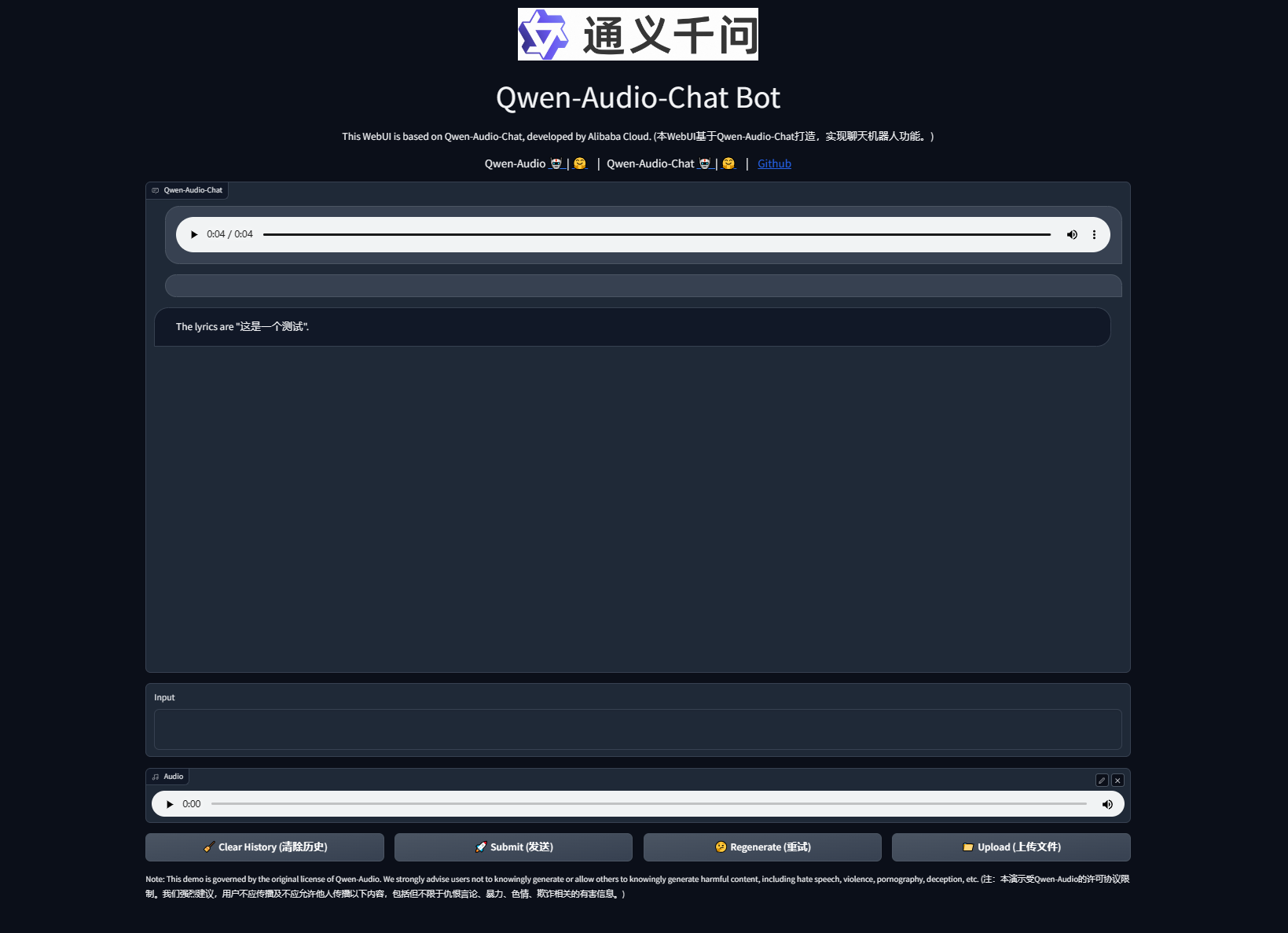
在终端中运行以下命令,启动streamlit服务,并按照 autodl 的指示将端口映射到本地,然后在浏览器中打开链接 http://localhost:6006/ ,即可看到聊天界面。
streamlit run /root/autodl-tmp/chatBot.py --server.address 127.0.0.1 --server.port 6006如下所示: